
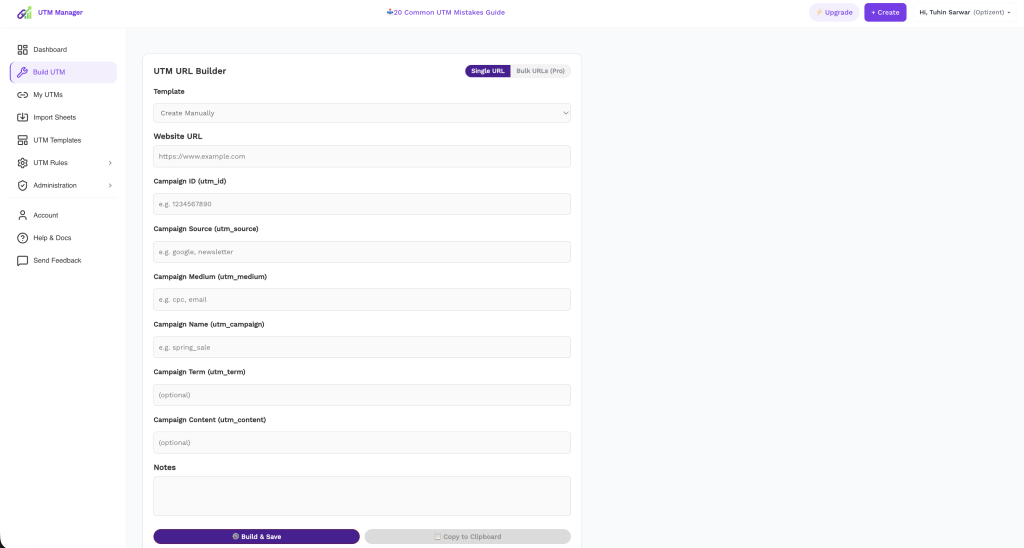
At first glance, the Build UTM page in UTM Manager looks like something you’ve seen before: fields for a URL, a source, a medium, a campaign, a button at the bottom. Google’s free Campaign URL Builder has looked roughly like this for a decade, and it’s where most marketers learned to tag.
Look closer, though, and almost every difference on this page exists to fix a specific way the free-builder workflow breaks down for teams. This post walks through the builder field by field — partly as a how-to, partly as a tour of the design decisions, because the decisions are the pitch.
The Problem With Every Free URL Builder
Google’s builder has one fatal characteristic: amnesia. You fill the form, copy the URL, and the moment you close the tab, that link never existed. No record of what you named the campaign. No way for a teammate to see the source value you used. No memory of last Tuesday’s spelling. Every link is an orphan, and every orphan is a fresh opportunity to type Facebook where last week you typed facebook.
Multiply by five teammates and twelve months, and the free builder isn’t free — you pay for it in GA4 rows that should have been one row.
The Build UTM page keeps the familiar form but attacks the amnesia at every step. Here’s the walkthrough.
Start at the Top: The Template Dropdown
The first field isn’t a URL — it’s Template, defaulting to “Create Manually.”
This ordering is deliberate. For any channel you tag repeatedly (Meta ads, your newsletter, partner links), you shouldn’t be composing from a blank page each time; you should be starting from a saved template that pre-fills the fields your convention has already decided. Manual creation is the exception you consciously choose, not the default you fall into.
Practical habit: the third time you build a similar link by hand, stop and turn it into a template. Blank-page tagging is where drift is born; templates are where it goes to die.
Website URL: The Base, Nothing But the Base
Paste the clean destination — landing page, product page — without any existing query strings if you can avoid it. If you’re tagging a URL that already carries parameters (some platforms append their own), double-check the final output so you don’t ship a link with two ? characters or duplicate parameters. And per the oldest rule in the book: this should be a page on your site that external traffic lands on. Internal links never get UTMs.
Campaign ID (utm_id): The Field Google’s Builder Doesn’t Have
Here’s a field you won’t find on most free builders, sitting third from the top: utm_id.
Short version of why it matters (long version in our complete parameter guide): campaign names get renamed mid-flight; campaign IDs are permanent. And in GA4 specifically, utm_id is the join key for cost data import — the feature that lets you see Meta and TikTok spend and ROAS inside GA4. No IDs on your links, no non-Google ROAS in your reports.
Recommendation: for paid campaigns, always fill it, using a boring incrementing scheme (cmp-2026-0041). For a quick organic social post, you can skip it. The field being right there in the main flow — instead of buried in an “advanced” accordion — is a nudge toward the habit.
Source, Medium, Campaign: The Big Three
The heart of the form, with the usual division of labor:
- Source — who sends the click:
google,facebook,klaviyo, a partner’s name. Be specific;youtubebeatsvideo. - Medium — how it travels:
cpc,email,paid-social. This is the field with rules — GA4’s channel grouping matches medium against a fixed vocabulary, and off-list values send traffic to Unassigned. If any field deserves a closed list, it’s this one. - Campaign — what effort: a formulaic name like
2026_q3_de_brand_launchthat sorts chronologically and still parses a year later.
The quiet difference from a free builder: whatever you type here passes through your account’s Global Rules on the way out — lowercase enforced, spaces converted to your separator, special characters neutralized, blocklisted words rejected. The person building the link doesn’t need to remember any of that. The spring sale they typed leaves the page as spring_sale, every time, for everyone.
Term and Content: Optional, Not Useless
Both marked optional, both worth a habit:
- Term — keyword or audience. In GA4 it’s a free-form dimension (keyword reporting moved to Google Ads auto-tagging), so use it for what you need:
lookalike_3pct,brand_keywords. - Content — the variant:
hero_ctavsfooter_link,ugc_videovsstatic_carousel. This is the A/B testing dimension, and the one whose absence you regret exactly when a campaign works and you can’t tell which creative did it.
Notes: The Field That Pays Off in Six Months
A free-text box at the bottom, easy to skip, wrong to skip. “Requested by client, keep this campaign name even though it breaks convention.” “Influencer batch — Sara’s links.” “Deprecated after July — do not reuse.”
Every team has a moment, months later, staring at a weird value in GA4, asking “who made this and why?” With a free builder, the answer is archaeology through Slack. Here, the answer is attached to the link itself, findable by whoever needs it.
The Bottom Row: Where the Philosophy Lives
Two buttons: Build & Save and Copy to Clipboard. The order matters.
A free builder’s only output is your clipboard — the most volatile storage medium in computing. Build & Save inverts that: the primary action writes the link into My UTMs, your team’s shared, searchable library. The clipboard copy is a convenience on top, not the system of record. That single design choice is the difference between “a form that concatenates strings” and “a link your team can find, reuse, and audit in a year.”
And in the top corner, the Single URL / Bulk URLs toggle acknowledges the other reality of campaign work: launches rarely need one link. When you need the grid — every landing page × every source × every medium — you switch modes instead of opening a spreadsheet and reintroducing all the errors the builder exists to prevent. (For very large batches, Import Sheets covers the CSV route.)
A 60-Second Workflow, Start to Finish
- Template → pick your channel template (or Create Manually for a one-off).
- URL → paste the clean landing page.
- utm_id → fill it if paid; your ID scheme, next number up.
- Source / Medium / Campaign → the big three, knowing rules will normalize whatever you type.
- Term / Content → audience and variant if they’ll matter in analysis.
- Notes → one line of context for future-you.
- Build & Save → link is live in the library. Then copy.
The form takes a minute. What you get for that minute is a link that’s formatted identically to every other link your team has ever made, visible to everyone, annotated, and impossible to lose. Google’s builder gives you a string; this gives you a record.
That’s the whole difference between building URLs and managing them — and it’s the reason the product isn’t called UTM Builder.
Build your first governed link. Start free with UTM Manager — same familiar form, none of the amnesia.
Still Building UTM Links in Spreadsheets?
Create clean campaign URLs faster, save templates, and standardize naming across your team.